How the Web Works
-
A simple and clear introduction to how the web works — covering DNS, servers, browsers, HTTP, and the complete request-response cycle for beginners.
What is the Internet ?
The Internet is a 🌍 global network that connects millions of computers, phones, and devices so they can share information and exchange data with each other.
It is made of many connected networks, linked together using routers, switches, and communication cables.
How the Internet Works
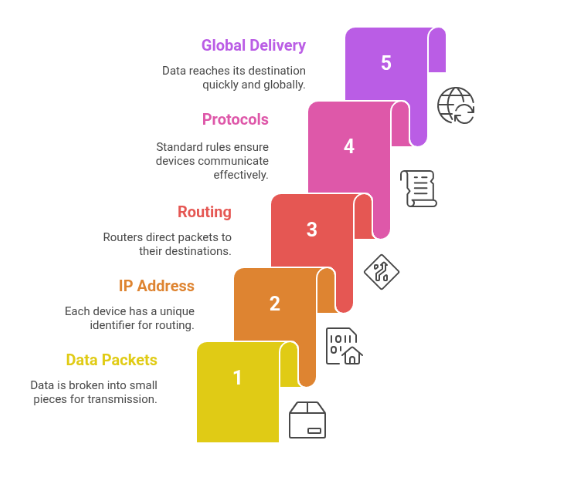
Data on the internet travels in tiny pieces called 📦 packets.
Every device on the internet has a unique 🏠 IP address (like a home address).
This IP address tells the packets where to go.
The Internet uses common rules called 📜 protocols (like HTTP, TCP/IP) so that all devices can understand each other.
💡 Simple Analogy
Think of the Internet like a 📮 huge postal system:
Packets = letters
IP address = postal address
Routers = post offices that forward the letters
Cables/WiFi = roads that carry the letters
the Internet delivers data from one device to another—quickly and globally.
What is a Website ?
A website is a collection of HTML, CSS, JavaScript, and image files stored on a server and sent to a user's browser when they visit it.A website lives on one or more 🖥️ servers.
When you type a URL, your 🌐 browser sends a request to the server.
The server responds with HTML (the main structure of the page).
Your browser then builds, renders, and displays the final webpage you see on the screen
After receiving HTML, the browser automatically requests additional files like...
🎨 CSS (for design and styling)
⚙️ JavaScript (for interactivity)
🖼️ Images (photos, icons, graphics)
🔍✨ Website vs Web Application
Although both websites and web applications run in a browser, they are not the same.
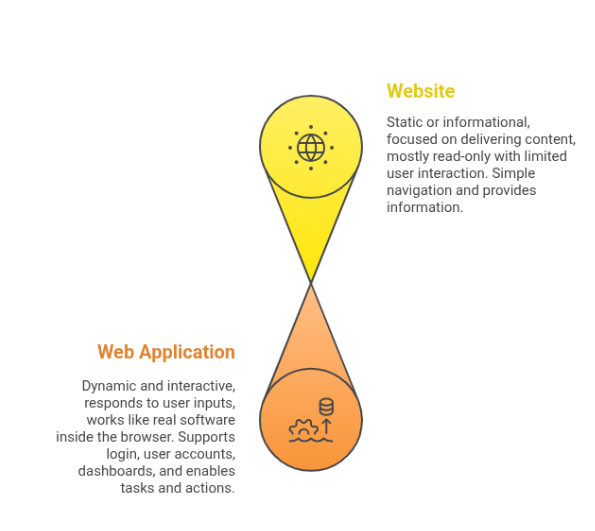
🌐 Website
A website is usually:
📄 Static or informational
📰 Focused on delivering content
👀 Mostly read-only
📝 Limited user interaction
🧭 Simple navigation
🎯 Purpose: Provide information
Examples of Websites:
Blogs
News sites
Portfolio sites
Company info pages
Online documentation pages
💻⚙️ Web Application
A web application is:
🧠 Dynamic and interactive
🔄 Responds to user inputs
🏗️ Works like real software inside the browser
🔐 Usually supports login, user accounts, dashboards
🛒 Allows users to perform actions (create, edit, buy, upload, etc.)
🎯 Purpose: Enable tasks and actions
Examples of Web Applications:
Gmail (email app)
Instagram Web (photo sharing + messaging)
YouTube (uploading, commenting, interacting)
Amazon (shopping cart, checkout, orders)
Google Docs (document editing)
💻⚙️ Web Application
A web application is:
🧠 Dynamic and interactive
🔄 Responds to user inputs
🏗️ Works like real software inside the browser
🔐 Usually supports login, user accounts, dashboards
🛒 Allows users to perform actions (create, edit, buy, upload, etc.)
🎯 Purpose: Enable tasks and actions
Examples of Web Applications:
Gmail (email app)
Instagram Web (photo sharing + messaging)
YouTube (uploading, commenting, interacting)
Amazon (shopping cart, checkout, orders)
Google Docs (document editing)
💻⚙️ Web Application
A web application is:
🧠 Dynamic and interactive
🔄 Responds to user inputs
🏗️ Works like real software inside the browser
🔐 Usually supports login, user accounts, dashboards
🛒 Allows users to perform actions (create, edit, buy, upload, etc.)
🎯 Purpose: Enable tasks and actions
Examples of Web Applications:
Gmail (email app)
Instagram Web (photo sharing + messaging)
YouTube (uploading, commenting, interacting)
Amazon (shopping cart, checkout, orders)
Google Docs (document editing)